

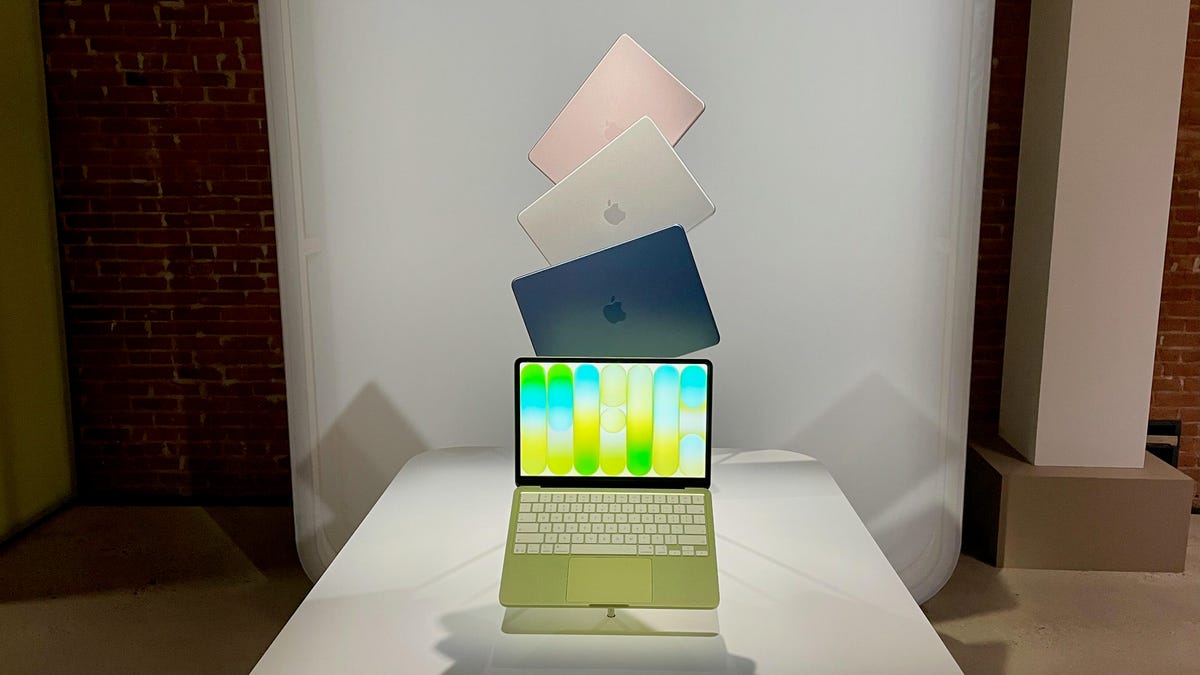
The wait for an inexpensive MacBook for day-to-day work and entertainment is over. On Wednesday, Apple announced the lower-cost MacBook Neo that’s sure to be a hit with those who wanted a MacBook, but spending $1,000 or more for a MacBook Air was out of reach. The new MacBook Neo starts at $599 (£599, AU$899), and you can get it for $499 with Apple’s educational discount.
Taking on Chromebooks and cheap Windows laptops, the MacBook Neo isn’t based on an Apple M-series processor, which powers Apple’s newly announced MacBook Air and MacBook Pro models. Instead, it uses the A18 Pro chip that’s found in the iPhone 16 Pro from 2024. The A18 Pro has a six-core CPU (two performance cores and four efficiency cores) and a five-core GPU. Compare that with the M5 chip that powers the new MacBook Air: The M5 has a 10-core CPU (four performance cores that Apple now calls “super cores” and six efficiency cores) and either an eight- or 10-core GPU.
Also read: Everything Apple Announced This Week, From iPhone 17E to MacBook Neo
To hit a lower price, the MacBook Neo has a 13-inch display that’s slightly smaller than the 13.6-inch screen on the smallest MacBook Air. Still, the size is a pleasant surprise since rumors were pointing toward a 12-inch display for Apple’s budget MacBook. It’s a Liquid Retina display that should look plenty crisp, with a 2,408×1,506-pixel resolution. And it’s rated for an ample 500 nits of brightness, so you should be able to use it outside and still make out what’s on the screen.
Not surprisingly, the baseline MacBook Neo forces you to make do with 8GB of RAM and a 256GB solid-state storage, which is half the memory and storage that Apple offers on the baseline MacBook Air.
You can’t upgrade the memory, but you can double the storage to 512GB, a $100 upgrade that also adds Apple’s Touch ID to the keyboard. That’s it in terms of Neo upgrades.
Color isn’t cost-prohibitive because Apple offers the MacBook Neo in an array of colors: blush (pink), citrus (yellow) and indigo (dark blue) in addition to basic silver. The color options are more muted than the bright hues I was hoping to see.
Ports are minimal and underwhelming. Instead of the speedy Thunderbolt 4 ports found on the MacBook Air, the Neo supplies a pair of slower USB-C ports. You get a 10Gbps USB 3 port and a 480Mbps USB 2 port, along with a headphone jack.
Another sacrifice you must make with the Neo is sure to disappoint students who put off doing their homework until the wee hours of the night: The keyboard doesn’t have backlighting.
You can preorder the MacBook Neo now, and it will start shipping next Wednesday, March 11.
Watch this: New MacBooks Arrive With M5, M5 Pro and M5 Max chips
First-hand experience with the MacBook Neo
CNET was at the Apple launch event for the Neo in New York City, and we got to spend some time using the newest MacBook. It looks and feels decidedly premium compared to a lot of the Windows competition at its price. The all-aluminum body is lightweight but still rigid, and certainly feels like it’ll be able to withstand daily use for school or office work. The four color options all look great, and the keyboards and MacOS elements are color-matched.
We saw demos of the A18 Pro chip’s performance, and it really zipped along through tasks, which isn’t really all too surprising. If you’re a heavy multitasker, you’re looking to do demanding photo or video editing, or graphic-intensive gaming or local LLM use, you’ll want to step up to an Air or Pro. But if your main goal is to do the stuff you’d normally do on an iPhone, including working with photos and videos and mobile gaming, but with a bigger screen and a full keyboard and trackpad and the app availability of MacOS, this is your MacBook.
The Neo does seem like an especially good choice for school and home office/small office users, much like a premium Chromebook. If you’re an iPhone user, though, the Neo certainly has the edge, because you’re able to use iPhone mirroring with the Neo. The devices complement each other in a way that you simply don’t get with a Windows laptop or Chromebook.
Read the full article here
