

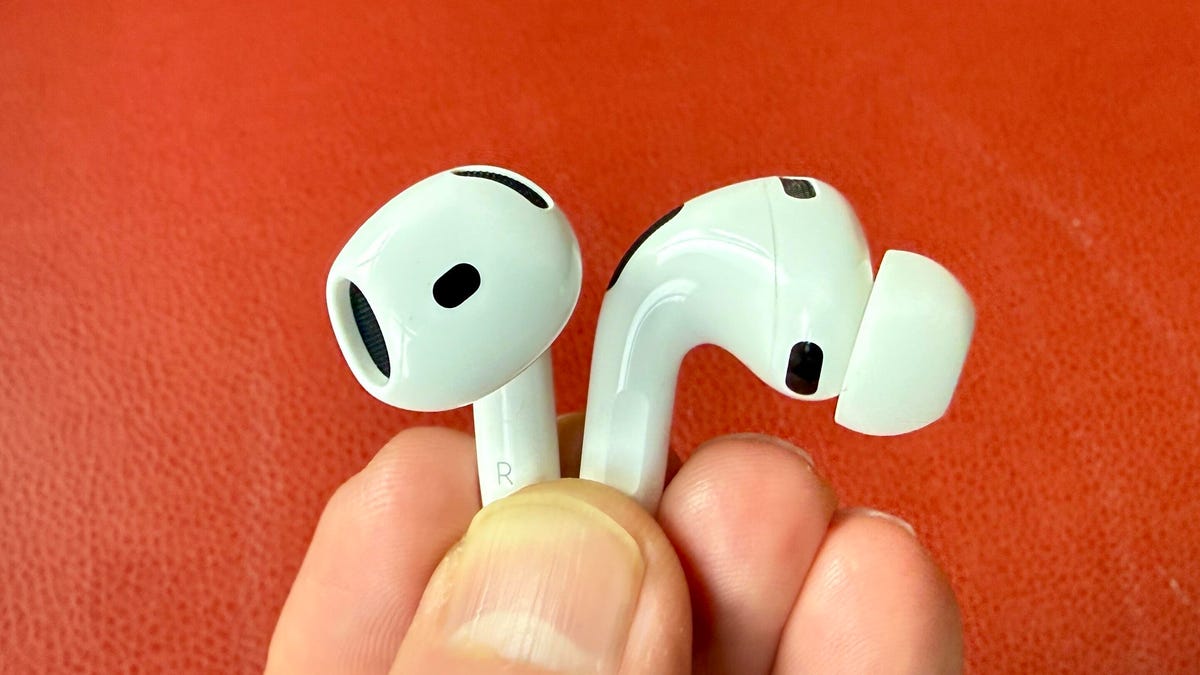
I’d been wearing my AirPods Pro 3 for months without ever touching one of its headline features.
I remember sitting through Apple’s September keynote when the company announced the heart-rate tracking function in its new earbuds. The news drew one of the loudest rounds of applause of the event and I was excited to test it out. Measuring your heart rate from your ears felt futuristic, even if it wasn’t entirely new.
But then I got home and went right back to recording every workout with my Apple Watch.
There wasn’t much reason to change. The Apple Watch Series 11 beat out every smartwatch I tested in our CNET Labs heart-rate comparisons against a Polar chest strap (designed explicitly to track heart rate), so I wasn’t expecting a pair of earbuds to come anywhere close.
Spoiler: They did.
The bottom oval (seen in on the right earbud) houses the heart rate sensor on the AirPods Pro 3.
The Apple Watch Series 11 still takes the crown for heart rate accuracy, but if I’d included the AirPods Pro 3 in my previous comparisons, they would’ve beaten out every other smartwatch on my list.
Health tracking moves beyond the wrist
Consumer health tracking started on the wrist, but it isn’t staying there. Fitness trackers and smartwatches have made 24/7 heart-rate monitoring mainstream, with enough accuracy to flag potential heart conditions, sleep issues, and, in some cases, trigger emergency alerts. Now similar sensors are showing up in smart rings, earbuds, smart earrings, and soon even smart glasses, pulling the same signals from different parts of the body.
But to become the next health-tracking hub, each new location has to prove it can measure those signals as accurately as the wrist.
Wearables like the earbuds and smart rings are tracking vitals beyond the wrist.
Why your ear might be a better place to measure heart rate
Tracking heart rate from your ears might be foreign to me, but I wasn’t exactly starting from scratch. A few months earlier, Whoop’s now-infamous “thong” accessory (yes, the fitness company makes performance underwear that lets you wear its sensor on different parts of your body) sent me down a but of a rabbit hole. I interviewed physicians and wearable experts about whether different parts of the body are better suited to specific health signals.
The answer depends on what you’re measuring. Fingertips, for example, work well for blood oxygen because they’re packed with small blood vessels, and thinner skin lets more light pass through.
Heart rate is different. As a general rule of thumb, the closer a sensor sits to the heart (and the less it moves during exercise), the cleaner the signal.
That gives the ear a couple of advantages over the wrist. It’s closer to the heart and stays more stable while you run. But it can also be more sensitive to environmental conditions. Cold affects both parts of your body by reducing blood flow and making optical readings harder, but the ears tend to feel that impact more quickly and more intensely than the wrist.
Sensor location, however, is only part of the equation and the real magic is in how the data gets processed. Apple has spent over a decade refining the Apple Watch’s heart-rate algorithms and it shows in the results. In my previous CNET Labs testing against a Polar H10 chest strap, the Apple Watch Series 11 averaged less than a 1% margin of error, making it the most accurate smartwatch I’ve tested to date.
The AirPods Pro 3 may be new to heart-rate tracking, but they build on years of groundwork laid by the Apple Watch. They use similar photoplethysmography technology, with algorithms informed by Apple Watch data and trained on more than 50 million hours of Apple Health Study data, adapted for a much smaller form factor. Apple says the sensor is the smallest the company has ever built.
The question isn’t whether they can measure heart rate, it’s whether they can come close to the Apple Watch.
How I tested the AirPods Pro 3 against the Apple Watch
For every wearable I’ve tested, I use the same benchmark: the Polar H10 chest strap (CNET’s gold standard for consumer heart-rate tracking). While the optical sensors in the Apple Watch and AirPods estimate heart rate by measuring changes in blood flow using reflected light, the Polar measures the heart’s electrical signals directly. Think of it as measuring the rock hitting the water instead of the ripples it creates. By design, there’s no way these sensors can match that signal, but they can compensate with machine learning and come surprisingly close.
Your smartwatch estimates heart rate by shining light into your skin and measuring how much reflects back as blood flow changes
To keep the comparisons consistent, I ran every test on the same college track using the same protocol I’d developed for previous CNET Labs smartwatch testing. Each workout covered four laps, or 1 mile.
The first lap is the ramp up to raise my heart rate from resting. The next two laps are a steady cruising altitude at a medium pace through the middle heart-rate zones. And the final lap is an all-out sprint to push my body as close to my maximum heart rate as possible. Max heart rate is generally estimated as 220 beats per minute minus your age.
Using the same route, pace and effort each time helps eliminate variables, so the only thing that changes is the device.
Watch this: I Ran 30 Miles and THIS Is the Most Accurate Smartwatch
Before testing the AirPods, I reran the Apple Watch Series 11. I already had data from previous CNET Labs testing, but I wanted both devices to compete under the same conditions. Temperature, humidity and even blood vessel constriction can influence optical heart-rate sensors, so I tested both on the same track during the same stretch of 90°F weather.
I strapped it on, ran four laps and finished the workout. Plug and play, no drama.
But if you’re also wearing an Apple Watch, things get tricky. The system can pull heart-rate data from both devices and typically prioritizes whichever has the stronger signal. So to isolate the AirPods, I took off the Apple Watch and left it on a nearby bench, assuming that would force the Fitness app to rely on the earbuds instead. I started a workout from the Fitness app, confirmed the AirPods were connected and took off.
Once I was done, however, half the heart-rate data had disappeared from the graph. I still don’t know whether I accidentally interrupted the recording by switching apps mid-run – I was toggling back and forth to check the Polar strap’s data – or whether the Fitness app tried to reconnect to the Apple Watch. Either way, the fact that I still don’t know doesn’t speak well for the AirPods’ convenience.
Apple says you should check the fit (a good sound seal doesn’t necessarily mean a good heart-rate signal) and make sure your ears and the sensors are clean. Maybe my ears were just sweatier than my wrists on that particular day.
Attempt No. 2 to get AirPods heart-rate data ended even more dramatically. Halfway through my third lap, the track sprinklers kicked on, and a drop of water landed directly on the stop button on my phone. In an instant, my run ended and all my sweat had been in vain.
By that point, the Apple Watch had already won on convenience alone.
On my third attempt, I turned the Apple Watch completely off, left the Fitness app open for the entire workout and successfully dodged the sprinklers.
I logged two complete AirPods runs and then dug into the data. At first glance, the workout summaries looked nearly identical. Average heart rate differed by only a couple beats per minute, and peak heart rate came in about 3 bpm lower on the AirPods. That’s fairly normal considering optical sensors tend to lag slightly during rapid spikes in heart rate.
But workout summaries are just a snapshot. To get the full picture, I needed to compare every single heart-rate reading across the run.
Polar makes it easy to export raw, second-by-second heart-rate data from a single run as a CSV (spreadsheet) file. Apple, on the other hand, requires exporting your entire Health history to get the same data (11 years’ worth, in my case). Fortunately, there’s a workaround: third-party apps like HealthFit can parse everything for you, letting you isolate a single workout and export it neatly into a spreadsheet.
Once I had clean files for each, I sent them to CNET Senior Lab Engineer Gianmarco Chumbe to run the numbers. He matched each AirPods reading to the corresponding Polar chest strap data and calculated the error rate, along with the averages.
The AirPods didn’t beat the Apple Watch, but they beat my expectations
I expected the AirPods to be good enough for casual workouts. I didn’t expect them to outperform most of the smartwatches I’ve tested. Compared with the Polar H10 chest strap, the AirPods Pro 3 were off by about 2 beats per minute on average (roughly a 1.2% error). The Apple Watch still did better, but not by much, coming in at under 1 beat per minute off on average (0.63% error).
Comparison with the Polar chest strap
| Average heart-rate error (bpm) | Average heart-rate error (%) | |
|---|---|---|
| AirPods Pro 3 | 2.02 | 1.23% |
| Apple Watch Series 11 | 0.89 | 0.63% |
For context, CNET Labs has compared top smartwatches — including Samsung’s Galaxy Watch 8, Google’s Pixel Watch 4, Garmin’s Venu 4 and the Amazfit Bip 4 — against the same Polar chest strap using this protocol. Most optical heart-rate sensors fall within a 7% error rate.
Based on my results, the AirPods would have finished second only to the Apple Watch in that lineup.
|
Apple Watch Series 11 |
0.89 |
0.63% |
|
AirPods Pro 3 |
2.02 |
1.23% |
|
Garmin Venu 4 |
5.54 |
3.89% |
|
Google Pixel Watch 4 |
8.68 |
5.64% |
|
Samsung Galaxy Watch 8 |
10.51 |
6.66% |
|
Amazfit Bip 6 |
10.63 |
7.03% |
In my previous CNET Labs testing (February 2026), the Apple Watch averaged a 0.98% error. Rerunning the test under the same conditions as the AirPods (in much hotter weather) it actually improved to 0.63%.
Bottom line
Whether they’re building on the Apple Watch’s groundwork, benefiting from their position in the ear, or just using really good sensors (likely all fo te above), the AirPods can hang. They go head-to-head with the Apple Watch for heart-rate tracking and beat out all the other smartwatches I’ve tested. If you’re already spending $250 on AirPods Pro 3, you don’t need to drop another $400 on a watch just for heart-rate data.
The trade-off is convenience. There’s no screen, no quick way to check what’s going on, and you end up relying on your phone more than you’d like. Making sure everything is connected and actually recording can be half the battle. If you have both and want the best accuracy, use them together and let Apple pick the stronger signal.
More than anything, they’ve made me a believer: it’s possible to get accurate heart-rate data from your ears. That alone opens the door to new types of biometric wearables like earrings, glasses, and beyond (which we’re already starting to see). Where the ultimate health hub ends up on your body remains to be seen, but the ears are officially in the race.
Read the full article here
